Customers and locations
Select, add and edit customers
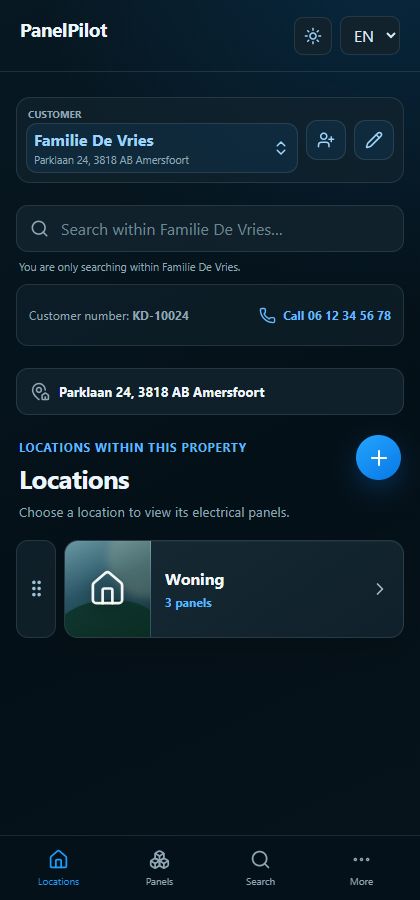
Installers work within one selected customer record. Check this selection before adding information.
Watch the video
Create a customer record
Transcript
- Open Locations and use the customer selector. Search by name, address, telephone number, customer number or internal reference.
- Choose Add customer to create a relationship. Enter name, street, house number, postal code and city; telephone and internal reference are optional.
- Check the proposed customer number and save. It must be unique within your installation company.
Step by step
Open Locations and use the customer selector. Search by name, address, telephone number, customer number or internal reference.
Select the customer. Locations and search results now belong to this record.
Choose Add customer to create a relationship. Enter name, street, house number, postal code and city; telephone and internal reference are optional.
Check the proposed customer number and save. It must be unique within your installation company.
Use the pencil beside the selected customer to edit details. Complete missing address fields when the form requires them.
Archive a relationship only when the action is offered and after reviewing the confirmation. Then check your active customer selection.
Good to know
- When making changes, check that the intended customer record is still selected.
- Customer contact details, the installation address and the billing address serve different purposes. Check billing settings when an address differs.